Hospital Supply Planning
Which items will run low, and what to order
Hospital Supply Planning forecasts demand from the patient-day forecast, flags the drugs and consumables that will run low and drafts order proposals for pharmacy and supply teams to review and approve.
Built for pharmacy, stores and wards
Each person sees the controls their role allows. A ward requester works on their ward, and a pharmacy supply manager works across the hospital.
Pharmacy and supply managers
Read the overview, open an item to see why it is flagged, and take order proposals through review and approval.
Store officers
Receive deliveries line by line, keep the controlled drugs register and move stock that is close to expiry.
Ward requesters
See the ward’s stock against its par level, what runs out before the next top-up, and request a top-up.
Procurement officers
Follow purchase orders, check lead times and chase a supplier from the same list.
The supply overview
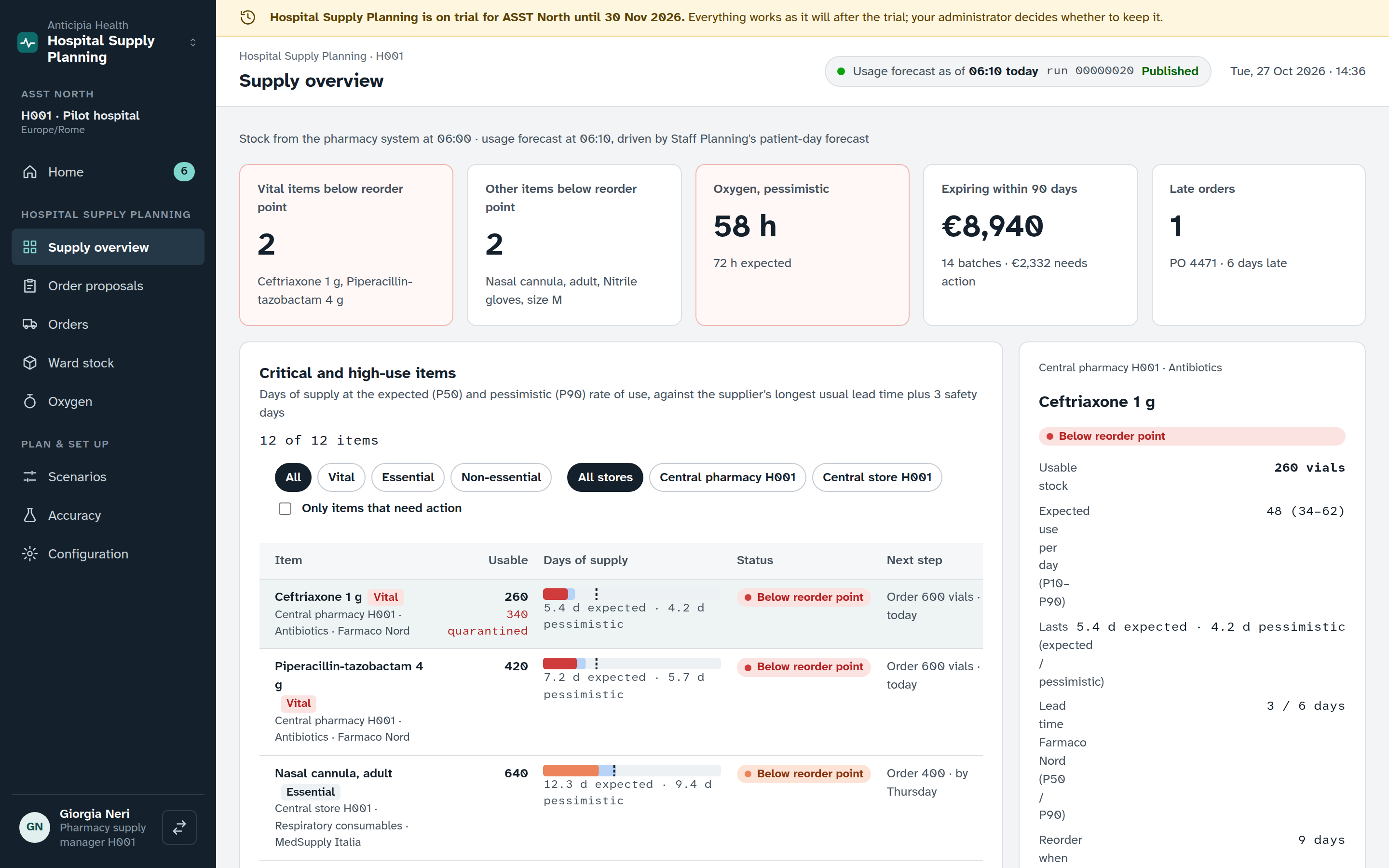
The overview opens with the freshness of the data, a row of tiles and a table of items by store. Choose an item and the Why panel explains the flag.
Every item, every store
The table carries store and criticality chips. Filter it to the items that need action. For each item it shows days of supply, for the expected case and the busy case, against the reorder point.
Why an item is flagged
The Why panel shows expected demand with its range, the supplier lead time and the cover that results, so the flag can be checked rather than trusted.
Actions and expiry
Open supply actions link to the Home inbox. The expiry list shows batches that may expire unused, with a Create transfer button to move them.
Order proposals
The plan run turns the forecast into order proposals for each store and supplier. Every line shows the recommended packs beside the ordered packs, and every change carries a reason.
- A plausibility check flags a quantity that looks wrong before anyone approves it.
- “Why this quantity” explains how a line was reached.
- Comments stay with the proposal, so the discussion is on the record.
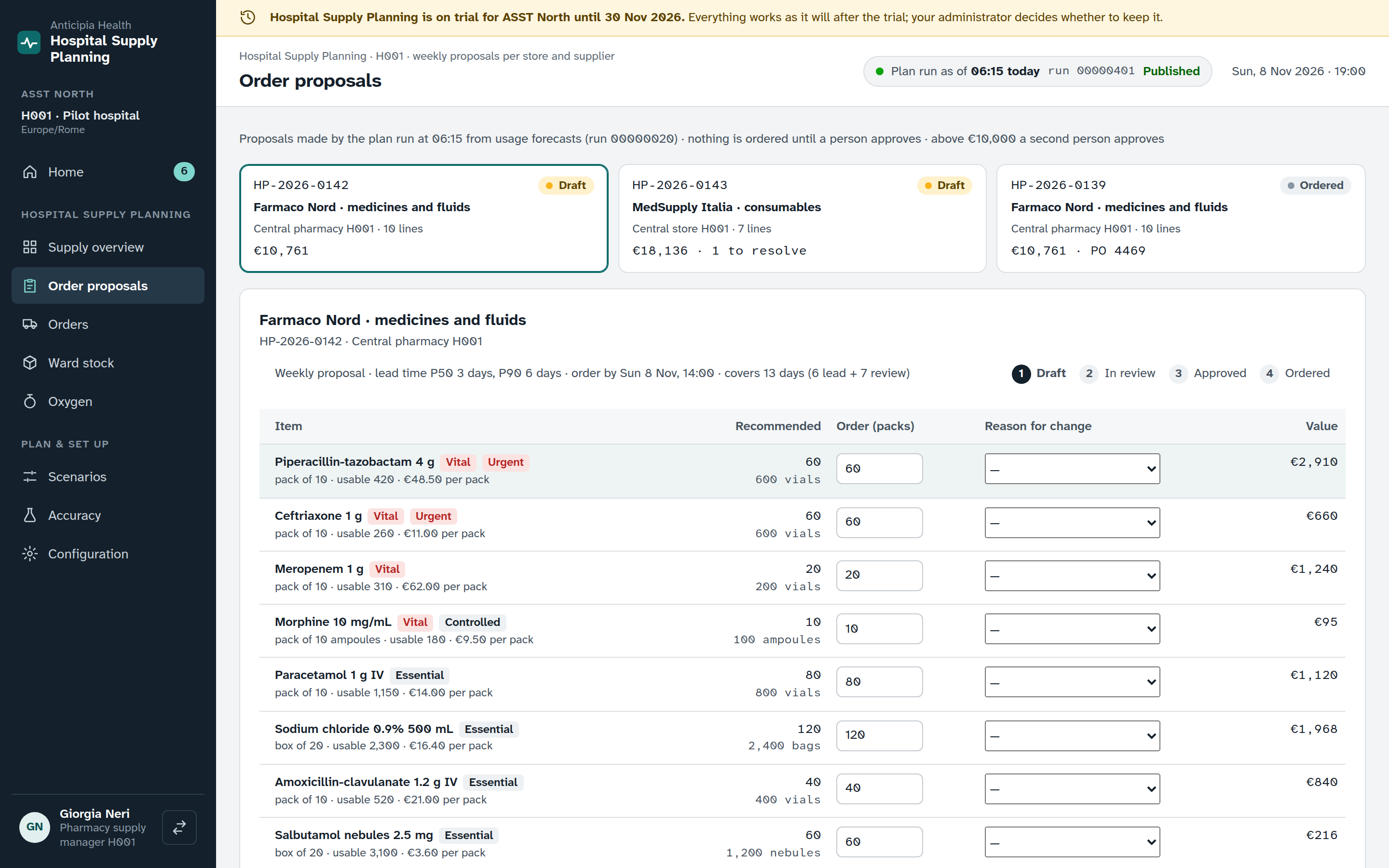
Draft
Edit the lines. Every change from the recommendation carries a reason.
In review
Submit the proposal. The reviewer sees the plausibility check and each line’s reason.
Approved
A person with the approve permission signs it off. Above a set value, a second person approves too.
Ordered
The proposal is marked as ordered, and its purchase orders are followed on the Orders screen.
Item detail
Open an item to see how its forecast is made and what the recommendation does to stock. Put the recommendation into the open proposal from the same screen.
On the item screen
- Daily use for each forecasting method, with its range.
- The patient-day driver that the forecast follows.
- A stock projection with and without the recommended order.
- The recommendation, and a button to put it into the open proposal.
- Batches, and recent orders for the item.
Orders, controlled drugs and recalls
The Orders screen has three tabs, one for each piece of work that follows a proposal.
Purchase orders
Tiles summarise the open orders, with lead times and a chase action. Receive an order line by line, with the code read from the pack.
Controlled drugs register
- Entries are made with a second person.
- Discrepancies are recorded and investigated, and the stock is counted again when the cause is a counting error.
- Destruction needs an authorised witness and a method.
- Confirmed entries can be exported for a chosen date range.
Recalls
A recall shows its trace, the responses recorded against it and the reminders sent, and it is closed when the work is done.
Ward stock and oxygen
Ward stock
Each ward stock point is shown against its par level, with use per day and days left. The screen lists what runs out before the next top-up and takes a top-up request.
Recall tasks for the ward appear here, and a proposed par level can be reviewed and edited.
Oxygen
The oxygen screen shows measured content and an outlook for 72 hours or a week, with hours of supply and a recommended delivery that can be requested.
It lists the drivers, a day-by-day view, deliveries, readings and the cylinder reserve.
Planned from patient days
Supply demand follows the patient-day forecast from Staff Planning. The overview shows that driver as a fan chart, with the expected case and the busy case.
The same census forecast sets the staffing requirement that Rostering drafts against.
One forecast, two uses
- Staff Planning forecasts the census for each ward.
- Hospital Supply reads it as the patient-day driver for demand.
- Rostering drafts against the staffing requirement built from the same forecast.
Scenarios, accuracy and settings
Scenarios
Save a what-if run on the latest supply plan: a patient-day surge on chosen wards, a supplier delay or a monthly budget cap. Compare the scenario with the baseline, or with another saved scenario, and see the items it affects most.
Accuracy and shadow mode
A weekly backtest scores each forecasting method for a product group against two baselines, 7 or 28 days ahead, with the stock outcomes. Make a method the default or put it in shadow mode, and run the backtest again tonight.
Configuration
Set stores, sources and lead times, and use the observed lead time when it differs. Save stocking policies as a new version from a date. Edit par levels and usage rates per patient-day, with the recent changes listed from the audit log.
See Hospital Supply working
Book a demo and open the supply overview, an order proposal and a ward’s stock.