Programme Supply Planning
What a programme needs, and how to fund and move it
Programme Supply Planning takes a forecast through review and approval into a supply plan, then follows funding, orders, shipments and stock from the country down to a facility.
Scoped to the place and programme you work on
Every screen is scoped to a place and to the programmes a person is given. A district user sees their district, a national planner sees the country, and the programme filter narrows what anyone sees.
National supply planners
Review the forecast, build the supply plan and take both through approval.
Programme managers
Work on their own programmes: forecast, plan, funding and orders.
Procurement and warehouse officers
Follow orders and shipments, record receipts and keep the store’s stock.
District pharmacists
See their district’s stock and reports, and record movements at their store.
Funders
Read the programmes they are given. A funder viewer changes nothing.
The programme overview
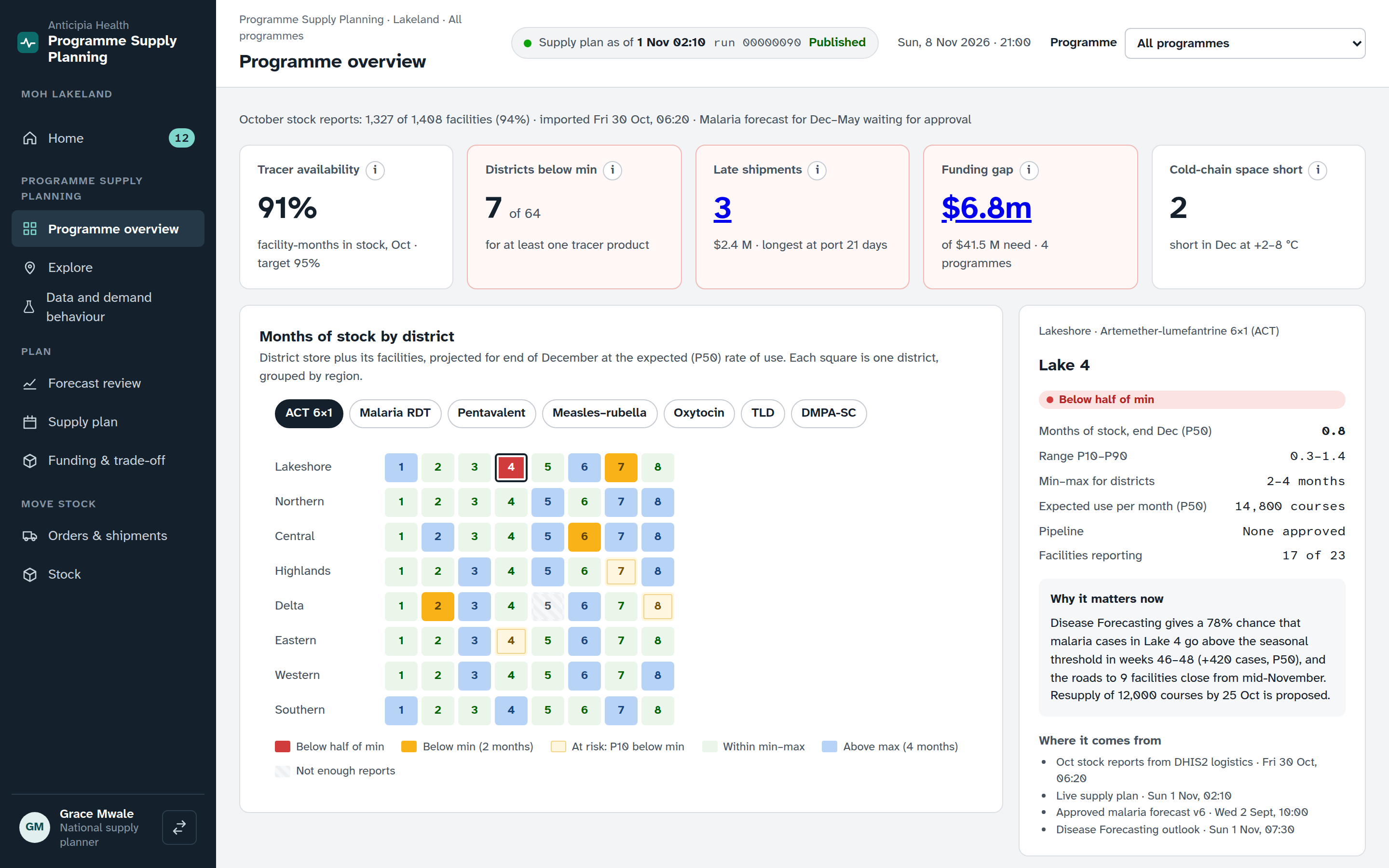
The overview opens with how much has been reported and how fresh it is. Choose a programme to filter the page, or a place to see its figures.
Tiles that explain themselves
Each KPI tile says what it means, how it is calculated and where its data comes from.
Months of stock by district
Months of stock for each tracer product, by district, or by facility below a district. Choose a place to see its figures and its note.
Action and access risk
What needs action links to the Home inbox. A panel shows the road-access risk for the next six months.
From data to stock on the shelf
Each step hands its result to the next.
Data
Reporting completeness, corrections and events show whether the numbers can be relied on.
Forecast review
Methods are compared for each product, adjusted if needed, and approved.
Supply plan
Recommendations for each product, accepted or changed, then approved and locked.
Funding
Commitments, co-financing and unfunded items are tracked against the plan.
Orders and stock
Orders and shipments are followed to receipt, and stock is kept at each store.
Data and demand behaviour
Before anyone reviews a forecast, the data screen shows what the numbers rest on. Reporting completeness is listed by district, with the districts furthest behind first, and Remind now sends a reminder to the facilities that have not reported.
- Each series says whether it is ready, and a planner sets the level it is forecast at, with a reason.
- Corrections wait for a decision. Approve one, or reject it with a coded reason.
- Events that change demand are logged, then confirmed.
- The state of each data import and the stock reports waiting for review are listed, and a report can be returned to the facility with a question.
Explore any place
Explore opens the place tree from the country to a facility. A region shows the places below it, and a facility shows its monthly reports. Copy link shares the exact view with a colleague.
Forecast review
For each product the review sets two methods side by side. Choose one, or blend them with a share you set, and give the reason.
Add an adjustment for a product at a place, with its reason, so a known change is on the record. The place selector keeps each view to the places you may read.
The run, its data and the checks it passed are stated at the top. Nothing in a review is official until it is approved.
Approval
- Submit the review. Withdraw it to make changes.
- The approver is neither the person who submitted it nor anyone who changed a method or an adjustment.
- Reject sends a submitted review back to draft and keeps the comment.
- Comments stay with the review.
Supply plan
The supply plan is a national screen. It lists a recommendation for each product, with a projection and the changes since the last version.
Accept or change a recommendation, submit the plan, and another person approves and locks it. The same rule applies as for the forecast: the approver did not submit it and did not change it.
Pre-positioning can be sent on from the plan.
Who sees the plan
- National planners and programme managers edit it for their programmes.
- Funder viewers read it.
- District users see the forecast and stock for their own place instead.
Funding and trade-offs
The funding screen sets what is needed against what is committed.
Funders and commitments
For each programme, record a commitment’s amount and move its status. Mark a payment as disbursed with its date.
Co-financing and gaps
Co-financing for immunisation is tracked alongside donor funding. Unfunded items are listed by programme.
Quantification
A quantification moves through its steps, from review to programme approval.
Orders, shipments and stock
Orders and shipments
- A pipeline calendar by channel, and the full order list.
- Move an order through its stages. Record the arrival check, then the receipt at the store.
- Accept or decline a donation before it moves on.
- Escalate a late shipment, and keep comments on the order.
- Procurement plan lines, contracts and lead times, with Draft order from a plan line and a link to its funding.
Stock at a store or facility
- Usable and held-back stock by product, with months of stock and batches in first-expiry-first-out order.
- What the plan expects, cold storage and any open delivery.
- Movements, newest first. A loss needs a reason code and is confirmed by a different person.
- Cycle counts are blind: the screen shows no recorded quantity until the count is confirmed, and the person who submitted a count cannot confirm it.
On the same platform
Programme Supply Planning shares sign-in, access and the assistant with the other products. The Ask button in the page header opens the assistant from any screen.
Rostering
The flagship product drafts rosters against working-time rules, from a staffing requirement built on a demand forecast.
Disease Forecasting
An outlook map by district, with the chance of crossing a threshold.
See Programme Supply working
Book a demo and follow a forecast through review and approval to a supply plan, funding and stock.